Programs/Subroutines
Masso G3 runs RapidChange tool changes from programs and subroutines that your profile generates. The Masso cannot pass a tool number to a tool change routine, so each tool in your Tools list gets its own subroutine, and the Pocket Tracker tells each subroutine which pocket's tool is in the spindle.
- Subroutines are numbered files, such as
631.nc. Your G-code and the programs call them withM98; you do not run them yourself. - Programs have names, such as
Load Tool 1.nc. You run them from the Masso.
The Macros Control
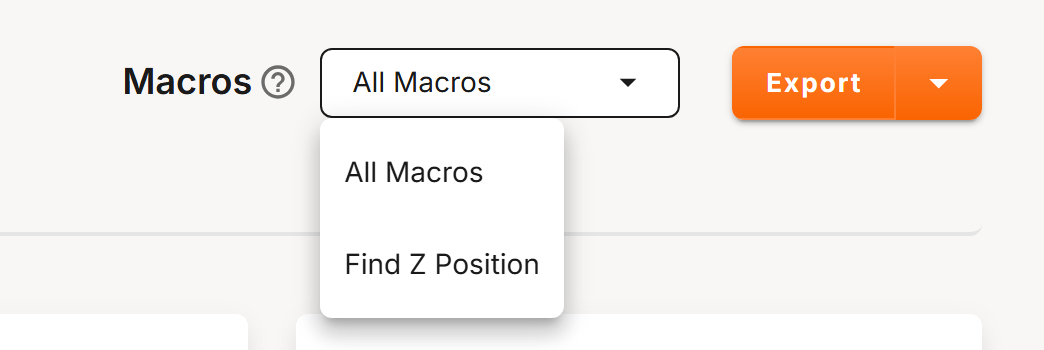
The Macros control is in the profile's header. Choose a package from its list, then Export or Download:
| Package | Contents |
|---|---|
| All Macros | Every subroutine and program for your profile. Unavailable while the profile has errors. |
| Find Z Position | The Find Z Position program and its subroutine. Shown only for a magazine with IR tool detection, and available while the profile has errors. |
- Export writes the files, unzipped, into a folder you choose. It is offered only when your browser supports it.
- Download saves them as a zip. Unzip it before you copy the files to the Masso.
Generate the files again, and replace them on the Masso, every time you change the profile. The files hold the profile's values; the Masso does not read the profile.
All Macros
The download is named after your profile: Subroutines. Its top level holds the subroutines and three programs; the Programs folder inside it holds the programs you run day to day.
| File | Kind | What it does |
|---|---|---|
63n.nc |
Subroutine | Changes to tool n: M98 P631 for tool 1, M98 P6312 for tool 12. One for each tool in Tools. Your post processor writes these calls into your G-code. |
601.nc |
Subroutine | The check that the beam is clear before a tool change. Generated when Pre-Op is enabled. Also in the programs folder. |
| Tool Change Test | Program | Changes to every tool in turn, then back to the first. |
| Pocket Tracker Test | Program | Tests each Pocket Tracker pair. See Pocket Tracker. |
| Show Active Pocket | Program | Shows the pocket the tracker holds. Also in the programs folder. |
| Load Tool n | Program | Changes to tool n, as 63n.nc does. One for each tool. |
| Unload Current Tool | Program | Returns the spindle's tool to its pocket and leaves the spindle empty. |
| Sync Pocket n, Sync Pocket Manual, Sync Empty Spindle | Program | Tell the tracker what is in the spindle. See Pocket Tracker. |
| Find Z Position | Program | In its own folder, with its subroutine 600.nc. See below. |
When a Macro Hook is enabled, the hook's steps are built into every tool change, and the top level also holds Before Tool Change Test or After Tool Change Test, which run the hook on its own. A hook with conditions or loops adds numbered subroutines from 700.nc. See Macro Hooks.
A Tool Change
Each 63n.nc, and each Load Tool n, runs these steps:
- With Ensure Sync, it checks that the tracker has been synced. If not, it stops with "Sync current pocket - not synced".
- It reads the pocket in the spindle from the tracker. If that pocket's tool is the tool asked for, it does nothing.
- It runs the Before Tool Change hook, stops the spindle, and opens the dust cover.
- With Pre-Op Enabled, it checks that the beam is clear. See Tool Detection.
- It rises to Z Clearance and unloads the tool in the spindle: into its pocket, or, for a manual tool, at the Manual Position with the message "Manual unload, cycle start". It then records an empty spindle.
- It loads the new tool: from its pocket, or, for a manual tool, at the Manual Position with the message "Manual load, cycle start". It records the new tool's pocket.
- It rises to Z Clearance, closes the dust cover, moves to the tool setter and calls
Tn M6, so that the Masso measures the tool. See Tool Setter Position. - It runs the After Tool Change hook and returns to your program.
Unload Current Tool runs steps 1 to 5 and rises to Z Clearance. Where a step stops with a message, fix the cause and press cycle start to continue.
The Masso shows at most 34 characters of a message.
If the tracker reads a pocket number that no pocket has, the subroutine shows "ERROR: Pocket n is invalid!" and returns to your program without changing the tool.
If you see "ERROR: Pocket n is invalid!", stop the job yourself: your program carries on with the tool that is already in the spindle. Sync the tracker before you run the job again. See Pocket Tracker.
Find Z Position
Run the Find Z Position program with a tool loaded in its pocket, deep enough to break the IR beam. It stops with "IR beam is clear. Adjust and retry" if the beam is not blocked. Otherwise it rises in 0.1 mm steps until the beam is clear, then stops with "Record MACHINE Z Position". If the beam has not cleared within 26 mm (about 1 in on an inch profile), it stops with "Beam still obstructed. Run again".
Copy both files, Find Z Position.nc and 600.nc, to the Masso. See Pocket Positions for the full procedure.