Tool Detection
The RapidChange ATC uses an infrared beam to check that each unload and load has worked. The IR sensor must be wired to an auxiliary input on your Masso G3 and selected here.
The section is shown only for a magazine with IR tool detection. On a profile with more than one magazine, it shows the magazine selected in the Magazines card.
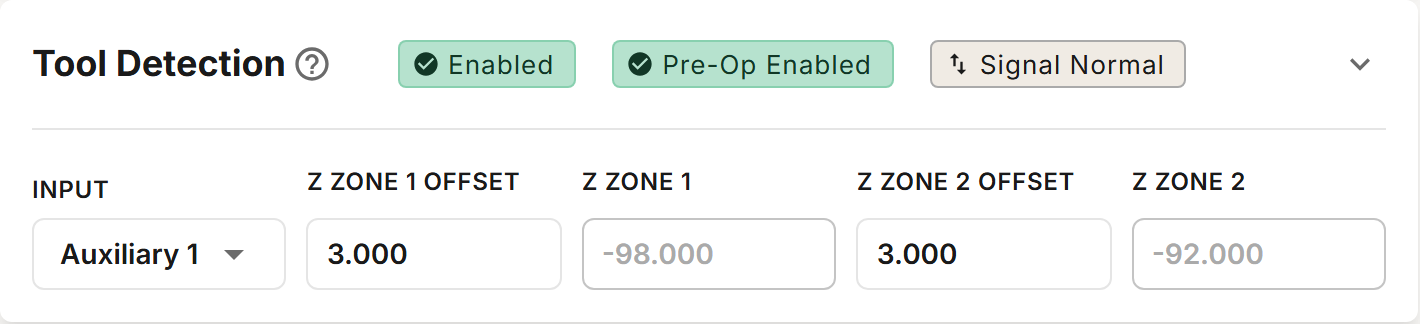
Chips
The chips in the section's header:
| Chip | Description |
|---|---|
| Enabled / Disabled | Turns tool detection on or off. While it is disabled, the section cannot be expanded. |
| Pre-Op Enabled / Pre-Op Disabled | Checks that the beam is clear before a tool change starts. Shown only while detection is enabled. |
| Signal Normal / Signal Inverted | Swaps how the input is read: a reading taken as beam blocked is taken as beam clear, and the other way round. If tool changes report the beam blocked when it is clear, or clear when it is blocked, switch it. A new profile starts with Signal Normal. |
Running the RapidChange ATC with tool detection disabled is not recommended in a regular workflow.
Fields
| Field | Description |
|---|---|
| Input | The Masso auxiliary input the IR sensor is wired to: Auxiliary 1 to Auxiliary 16. The default is Auxiliary 1. Inputs already used by the profile, such as a Pocket Tracker pair's, are disabled in the list. |
| Z Zone 1 Offset | How far below Z Position the zone 1 check is made. Default 3 mm. |
| Z Zone 1 | Read-only: Z Position minus Z Zone 1 Offset. |
| Z Zone 2 Offset | How far above Z Position the zone 2 check is made. Default 3 mm. |
| Z Zone 2 | Read-only: Z Position plus Z Zone 2 Offset. |
Each offset must be between 0 and 4 mm. The zones are measured from the Z Position of the magazine's first pocket in Pocket Positions. When you find a new Z Position, the zones follow it and keep their offsets.
More than one magazine
- The Input is shared: changing it on one magazine changes it on every magazine.
- The zone offsets belong to each magazine. A magazine added to an existing profile starts with tool detection disabled: enable it and set its offsets.
- The pre-op check uses the Pre-Op chip of the first magazine with IR tool detection. The other magazines' Pre-Op chips have no effect.
The Checks
| When | At | The beam must be | Meaning |
|---|---|---|---|
| After an unload | Z Zone 1 | clear | The nut has come off the spindle. |
| After the load strikes | Z Zone 1 | blocked | A nut is on the spindle. |
| After the load strikes | Z Zone 2 | clear | The nut is fully threaded, not caught on a thread. |
Each check waits up to one second for the beam.
If the unload check fails, the unload is retried once. If it fails again, the spindle rises to Z Clearance and the tool change stops with "Unload manually - Zone 1 failed": finish the unload by hand, then press cycle start to continue. If a load check fails, the tool change stops the same way with "Load manually - Zone 1 failed" or "Load manually - Zone 2 failed". When you continue, the tool is measured as if the load had worked.
The unload check follows the magazine the unloaded tool came from, also when the next tool is a manual tool and for Unload Current Tool.
With Pre-Op Enabled, a tool change that starts with the beam blocked stops with "IR beam obstructed. Stop or Retry". Clear the beam and press cycle start to check again. After five tries it ends with "Max attempts reached. End Program".
With tool detection Disabled, nothing is checked. Instead, the tool change stops after each unload with "Tool unloaded? Cycle Start" and after each load with "Tool loaded? Cycle Start".
Detection Zones
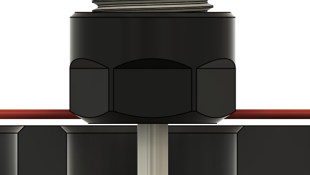
Zone 1 is the lower detection zone. A properly loaded tool breaks the beam at this height, while an empty spindle does not.
Z Zone 1 has more freedom of position than Z Zone 2.
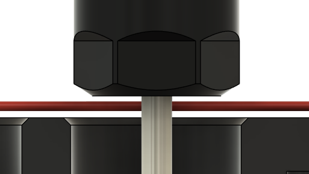
Zone 2 is the upper detection zone. A properly loaded tool clears the beam at this height, while a tool that failed to thread completely still breaks it.
Z Zone 2 has a small working range (2–3mm). If you see false failures when loading, the Z Zone 2 Offset may need adjustment.