Tool Change
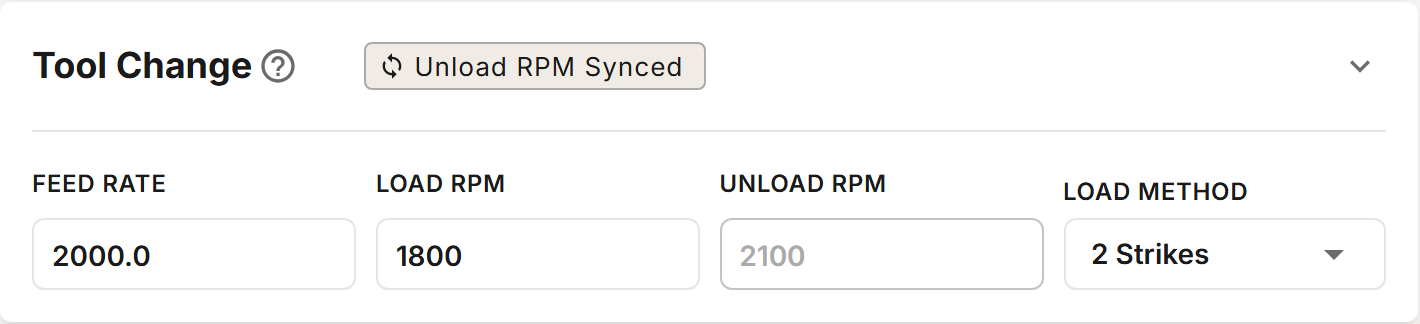
The Tool Change section sets the spindle speeds, feed and number of strikes used to load and unload tools. If your profile has more than one tool setter, it also chooses which setter measures the tools from this magazine.
On a profile with more than one magazine, the section shows the magazine selected in the Magazines card. Set it up for each magazine.
The correct spindle speed is crucial. Excessive RPM will damage the sockets.
Fields
| Field | Default | Description |
|---|---|---|
| Feed Rate | 2000 mm/min | The feed for the strikes. The recommended range is 1500 to 2000 mm/min. |
| Load RPM | 1800 | The spindle speed for loading a tool. Tightness comes from the RPM and the number of strikes. The maximum is 2500. |
| Unload RPM | 2100 | The spindle speed for unloading a tool. While synced it is Load RPM + 300 and cannot be edited. The maximum is 2800. |
| Load Method | 2 Strikes | 2 Strikes or 3 Strikes: how many strikes load a tool. |
| Tool Setter | The first tool setter | The tool setter that measures tools loaded from this magazine. Shown only when the profile has more than one tool setter. |
Unload RPM Synced / Overridden
The Unload RPM Synced / Unload RPM Overridden chip in the section's header switches Unload RPM between following Load RPM and a value you set.
- Unload RPM Synced: Unload RPM is set to Load RPM + 300 when you save. The field shows the new value after saving.
- Unload RPM Overridden: you enter Unload RPM yourself. Keep it at least 300 RPM above Load RPM. An Unload RPM lower than Load RPM is an error.
With the correct RPM, two strikes give enough torque for normal operation. Choose 3 Strikes only if the nut is not tight enough after adjusting Load RPM.
Tool Setter
If your profile has more than one tool setter, a Tool Setter select appears, listing the profile's tool setters by name. Tool setters are added on the Tool Setter tab. Each magazine measures its tools on the setter chosen here; a tool changed by hand at the Manual Position is measured on the setter chosen in Manual Position.
With a single tool setter the select is not shown, and every tool is measured on that setter.
Verifying Spindle RPM
Check that the spindle reaches the correct RPM on your VFD's display. If the VFD shows Hz, convert using 1 Hz = 60 RPM (for example, 1800 RPM = 30 Hz). You can also confirm the speed with a tachometer.