Tool Measurement
While Tool Measurement is enabled, a tool is measured during a tool change and whenever you run the Measure Tool macro. The spindle moves to the tool setter at X Position and Y Position in Tool Setter Position, then down to Z Start Position. From there it probes down toward the tool setter at Seek Feed. Where your controller shows Set Feed, a second, slower pass at Set Feed takes the measurement. The measurement then compensates for the new tool's length.
Your controller's own pages give its exact sequence and how the measurement is applied.
Profile Section
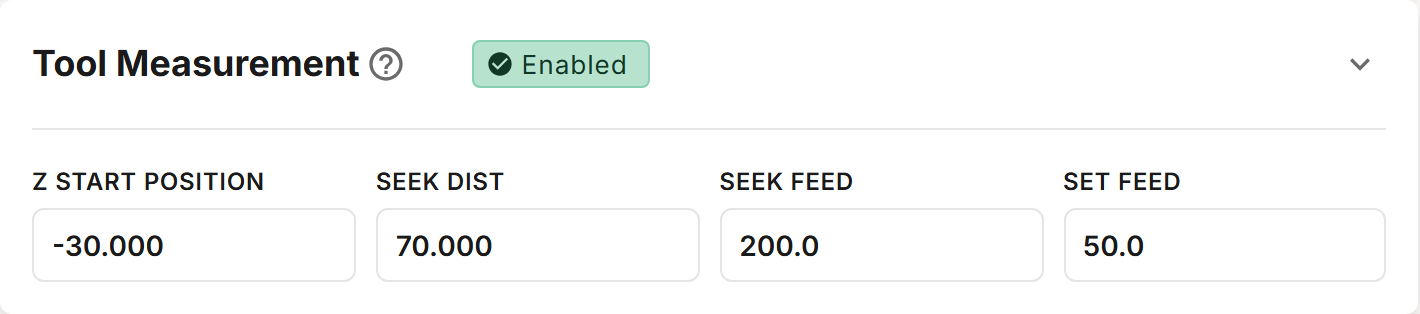
The chip in the section's header switches tool measurement between Enabled and Disabled. A new profile starts with it Enabled. While it is disabled, the section cannot be expanded, and no tool is measured, either during a tool change or by the Measure Tool macro.
It can help to get tool changes working first, with tool measurement disabled, and enable it once they do.
Fields
Your controller shows the fields it uses.
| Field | Description |
|---|---|
| Z Start Position | The MACHINE COORDINATE Z where the spindle starts probing. It may not be above Z Clearance. |
| Seek Dist | The farthest the spindle probes toward the tool setter. Default 70 mm. |
| Seek Feed | The feed rate of the first probe toward the tool setter. Default 200 mm/min. |
| Retract Dist | Where shown: how far the spindle lifts off the tool setter between the first and second passes. Default 2 mm. |
| Set Feed | Where shown: the feed rate of the second, slower pass. Default 50 mm/min, or 40 mm/min on a UCCNC profile whose magazine has a RapidChange chip. |
The feed rates are flagged outside 25–1000 mm/min, and Set Feed is flagged if it is faster than Seek Feed. Seek Dist is flagged outside 10–125 mm, and Retract Dist outside 1–20 mm.