Tool Measurement
Tool measurement uses a tool setter touch-off routine to automatically set tool length offsets. See the Measure Tool macro for usage details.
Toggles
| Field | Buttons | Description |
|---|---|---|
| Enable/Disable |   |
Enables or disables tool measurement. When disabled, the section collapses and tool measurement will not be performed during a tool change. The Measure Tool macro will not be generated. The Tool Setter Position section is also disabled. Disabled by default when a profile is first created. |
Fields
| Field | Description |
|---|---|
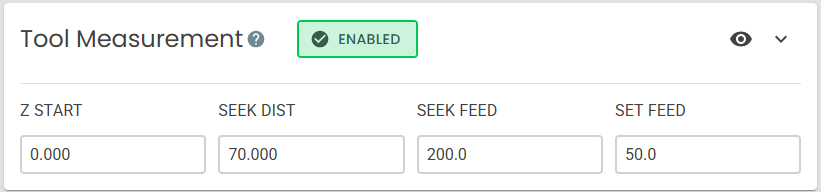
| Z Start | MACHINE COORDINATE at which the spindle will begin seeking the tool setter. |
| Seek Dist | Maximum distance the spindle will travel downward while seeking the tool setter. If the tool setter is not contacted within this distance, the probe fails. |
| Seek Feed | Feed rate for the initial probe toward the tool setter. |
| Set Feed | Feed rate for the secondary probe away from the tool setter. |
When first getting started, it can be useful to leave Tool Measurement disabled so that you can configure and test the tool change process itself first. Additional functionality can be enabled and configured afterward.
Measurement Routine
When tool measurement is triggered during a tool change or with the Measure Tool macro, the following routine is performed:
- The spindle moves into position above the tool setter as defined in Tool Setter Position.
- Any existing tool offset is canceled with
G43 Z0. - From Z Start, the spindle probes downward at the Seek Feed rate for up to Seek Dist until contact with the tool setter.
- The spindle probes upward at the Set Feed rate until contact is broken.
- The Z machine coordinate position is recorded and the tool length offset is applied using
G43.1 Z[value]where[value]is the recorded position.